How to Build a News App with the Beans API
A practical, mildly unhinged guide to building a news app with discovery views, stories, search, and source metadata.
September 8, 2026So you want to build a news app.
Excellent. You have chosen the noble path of displaying headlines, arguing with pagination, and discovering that “latest” and “trending” are two completely different ways for the internet to make you feel behind.
This guide shows how to build the bones of a news app with the Beans API. The examples use the public endpoint:
https://api.cafecito.tech/beansThat is the endpoint to put in your app configuration. We are not going to pretend a secret internal service name is a user-facing API. Growth!
What you are building
A useful first version needs four things:
- a Trending feed for attention-ranked headlines;
- a Just In feed for chronological news;
- a Story view that groups coverage of the same event;
- search and filters for people, companies, topics, regions, sources, and tags.
Beans supplies the publication data, normalized taxonomy, source metadata, trend signals, article details, similar articles, mentions, and story coverage. Your app supplies the buttons, layout, loading states, and at least one person asking why the headline card is three pixels too tall.
If you want to skip straight to the finished experience, open Beans. It is a ready news-discovery product built on the same general ideas described here.
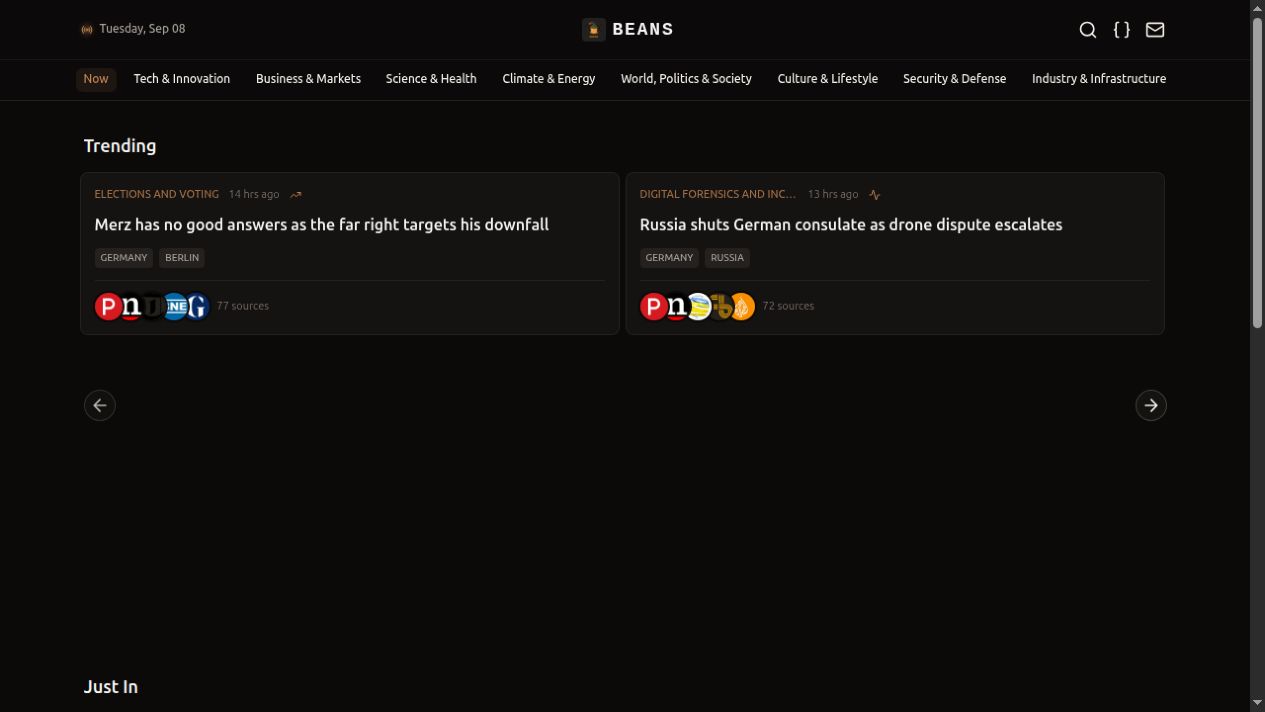
The Beans home screen: a dark coffee-colored UI, because apparently every news app eventually becomes a dashboard.
1. Get an API key
Start at the Cafecito Developer Portal. The API key guide explains how to create a key, and the Beans API reference documents the routes and parameters.
Keep the key on your server. Do not ship it in browser JavaScript unless your security strategy is “hope the DevTools tab stays closed.” A small server route, server action, or backend-for-frontend can call Beans and return only the data your UI needs.
The public API uses a Bearer token:
curl --get "https://api.cafecito.tech/beans/news/latest" \
  --header "Authorization: Bearer $CAFECITO_API_KEY" \
  --data-urlencode "languages=en" \
  --data-urlencode "limit=20"
Collection responses have the same broad shape:
{
  "data": [],
  "pagination": {
    "limit": 20,
    "num_results": 20,
    "next_cursor": "opaque-token"
  },
  "meta": {
    "as_of": "2026-09-08T12:00:00Z"
  }
}
num_results is the number of records in this page, not a grand total. next_cursor is opaque: save it, send it back unchanged, and do not decode it because curiosity is not a pagination strategy.
2. Create one tiny Beans client
The API is plain HTTP, so you do not need an SDK ceremony with twelve configuration files and a tiny ceremonial rake. Here is a server-side JavaScript helper using the built-in fetch available in Node 18+:
const BEANS_API = "https://api.cafecito.tech/beans";
const API_KEY = process.env.CAFECITO_API_KEY;

export async function beansGet(path, query = {}) {
  const url = new URL(`${BEANS_API}${path}`);

  for (const [key, value] of Object.entries(query)) {
    if (value !== undefined && value !== null && value !== "") {
      url.searchParams.set(key, String(value));
    }
  }

  const response = await fetch(url, {
    headers: { Authorization: `Bearer ${API_KEY}` },
  });

  const body = await response.json();
  if (!response.ok) {
    throw new Error(body.error?.message || `Beans returned HTTP ${response.status}`);
  }

  return body;
}
The endpoint routes are intentionally readable:
| App feature | Beans route |
|---|---|
| Latest news | /news/latest |
| Recent attention window | /news/top-headlines |
| Attention-ranked news with trend data | /news/trending |
| Semantic or filtered search | /articles/search |
| One article | /articles/{article_id} |
| Similar articles | /articles/{article_id}/similar |
| Story metadata | /stories/{story_id} |
| Story coverage | /stories/{story_id}/articles |
The Beans API workflows page has more complete call sequences, including source lookup, selected-article enrichment, and independent home-feed loading.
3. Load independent home feeds
Do not make one failing widget take the whole homepage hostage. Load the primary collections independently so “Trending is having a moment” does not also erase “Just In.”
export async function loadHome() {
  const results = await Promise.allSettled([
    beansGet("/news/top-headlines", {
      languages: "en",
      limit: 20,
    }),
    beansGet("/news/latest", {
      languages: "en",
      limit: 20,
    }),
  ]);

  return {
    trending: results[0].status === "fulfilled" ? results[0].value : null,
    latest: results[1].status === "fulfilled" ? results[1].value : null,
  };
}
Use the routes by intent:
news/top-headlinesis the recent, attention-ranked window—good for a headline carousel.news/latestis chronological—good for a “Just In” list.news/trendingcontains attention metrics when available—good when you want trend signals, not merely a fresh timestamp.
Keep those collections separate. “Top headlines” and “trending” sound like cousins, but they do not have the same job. Merging them into one mysterious soup makes debugging much more exciting than it needs to be.
4. Deduplicate by story, not by article
One event can produce many articles. If you render every article directly, your homepage may announce the same event six times because six publishers all discovered the same planet-sized fact.
Use story_id as the stable identity for a news event:
export function uniqueStories(articles) {
  const seen = new Set();

  return articles.filter((article) => {
    const key = article.story_id || article.id || article.url;
    if (!key || seen.has(key)) return false;
    seen.add(key);
    return true;
  });
}
If an article has no story_id, treat it as its own item. Do not invent a fake story ID, and do not use a related article’s ID as the parent item’s identity. That is how a harmless dedupe helper quietly eats your search results.
For a story card, use the story title and summary from /stories/{story_id} when you have them. For a story page, request the story metadata, then load its coverage:
export async function loadStory(storyId) {
  const [story, coverage] = await Promise.all([
    beansGet(`/stories/${storyId}`),
    beansGet(`/stories/${storyId}/articles`, { limit: 5 }),
  ]);

  return {
    ...story.data,
    coverage: coverage.data,
    nextCursor: coverage.pagination.next_cursor,
  };
}
The result is a much better reading flow: one event, its summary, the way it propagated, and the source coverage underneath. Less “same headline, different logo.”
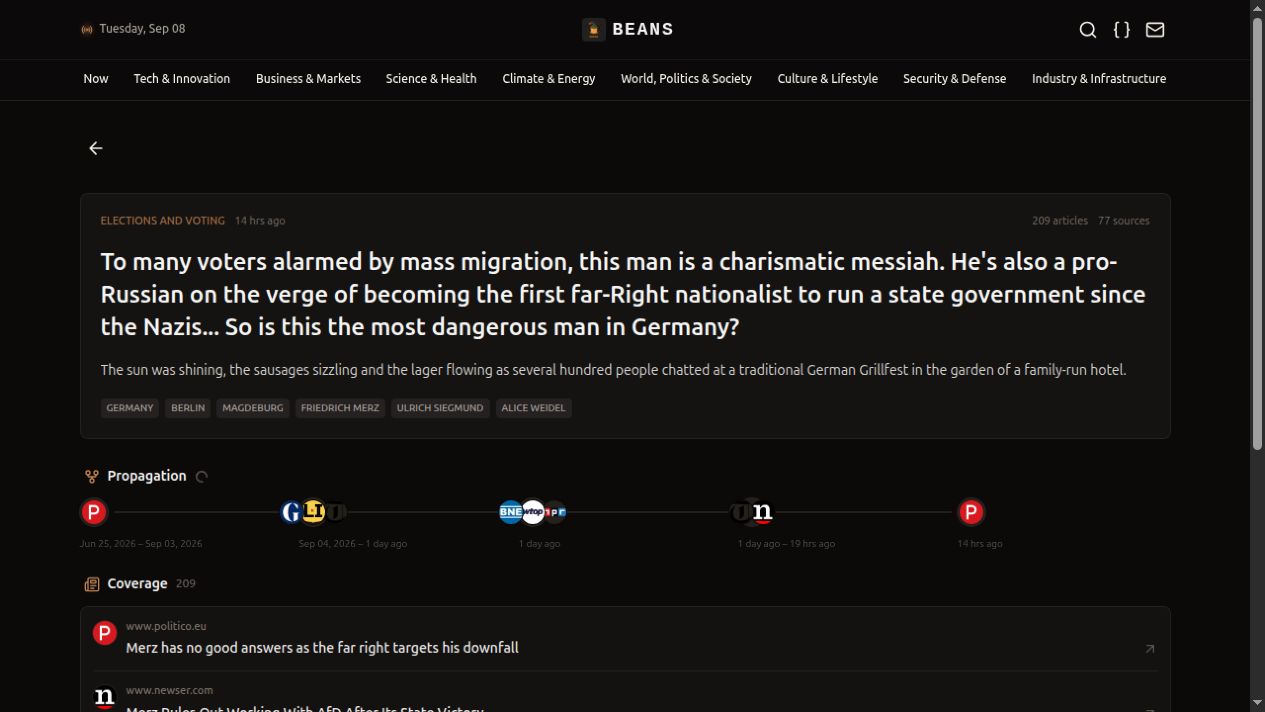
A Story view groups coverage into one event, with propagation and publisher links instead of making the reader play headline bingo.
5. Make pagination boring and dependable
For normal collections, request the next page with the same route and filters:
export async function loadNextPage(path, filters, cursor) {
  return beansGet(path, { ...filters, cursor, limit: 20 });
}
The important words are “same route and filters.” Do not send a cursor from news/latest to articles/search, and do not quietly change the category between page one and page two. The API cannot save us from ourselves.
For a polished UI, fetch enough records to reveal five unique stories at a time, then append the next five when the user reaches the end. The Beans UI implementation uses an internal batch of 20 and deduplicates by story_id before revealing cards.
There is one practical wrinkle: the top-headlines cursor can return an empty page even when a larger batch still contains more unique stories. A resilient client can expand the request—20, then 40, then 60, up to a safe cap—skip stories already shown, and stop when it has enough new items or the API returns no usable data. Latest News can continue with its returned cursor.
That sounds like a lot of words for “keep scrolling,” but production is where pagination develops a personality.
6. Add search without making taxonomy up
Beans returns normalized categories, regions, entities, sentiments, and tags. Use those values as filters. Your UI can display friendlier labels, but the request should send the accepted API values.
If a user types an unknown topic, resolve it first with discovery endpoints such as /categories?q=climate or /sources?q=publisher. If the normalized value is already known, skip discovery and query Articles directly.
export function searchNews(query, category) {
  return beansGet("/articles/search", {
    q: query,
    categories: category,
    content_type: "news",
    languages: "en",
    score_threshold: 0.3,
    limit: 20,
  });
}
Only send documented parameters for the selected route. Route-inapplicable parameters such as content_type on news/top-headlines can produce a 400, which is the API’s polite way of saying “please read the menu.”
7. Make cards honest
The Beans UI design has a few rules worth stealing:
- Show an optional article image; if it fails, remove it rather than displaying a sad broken-image monument.
- Use
source.site_name, thensource.domain_name, then the article URL’s host for a source label. - Use
source.favicon_urlwhen available, with a favicon fallback when it is not. - Show at most five source avatars, but display the authoritative
source_countseparately. - Render
mentions,likes,comments, andsharesonly when they are finite numbers greater than zero. Zero is not a social signal; it is a request to leave the row alone. - Represent the trend score with an icon or label instead of dumping a mysterious numeric score on the reader.
Also, treat summaries as untrusted content. News summaries may contain Markdown or image syntax. Render a safe subset, disable raw HTML, clamp long summaries, and never let an article body become an accidental layout takeover.
8. Design for the phone you are holding
News is usually consumed on a phone while someone is waiting for coffee, a train, or a meeting to end. Start with one card per row and one visible carousel slide. At wider breakpoints, move to two cards or two columns.
The reference Beans UI uses a dark charcoal and coffee-bean palette, horizontal category tabs that scroll inside their own row, and no page-level horizontal overflow. Those choices are not sacred. The useful part is the discipline: define the mobile layout first, then let the desktop layout earn its extra space.
For loading and errors, preserve context. A failed Latest News request should leave Trending usable and give the reader a retry action. An empty category should say it is empty. “Nothing happened” is technically concise but not especially helpful.
9. Add detail only when someone asks for it
Collection responses should stay compact. When a user opens an article, then request details such as:
GET /articles/{article_id}?full_content=true
GET /articles/{article_id}/similar
GET /articles/{article_id}/mentions
This keeps the home page compact and lets the detail view request available body content, related reading, and external observations. Always retain the original article url for attribution and the outbound link.
full_content=true requests content that may be available for the selected record. It does not grant ownership or downstream display, redistribution, bulk archival, resale, permanent retrieval storage, or model-training rights. Do not rely on the parameter for a source unless Cafecito has a documented basis to return that field for your intended use. Retrieve article detail when a reader selects it, preserve attribution and the canonical-source link, and assess the rights required for your use rather than treating the option as a bulk-content license.
The short version
- Create an API key in the Developer Portal.
- Call
https://api.cafecito.tech/beanswithAuthorization: Bearer YOUR_API_KEY. - Keep
top-headlines,latest, andtrendingas separate feeds. - Deduplicate with
story_idand fall back to the article’s own identity. - Treat
next_cursoras opaque and preserve filters between pages. - Use normalized taxonomy and honest source fallbacks.
- Build mobile-first, then add desktop breathing room.
- Fetch article detail, similar articles, mentions, and story coverage on demand.
For more routes and complete examples, use the Cafecito Developer Portal, the Beans API reference, and the Beans workflow scenarios. For a working product instead of another afternoon of “I’ll wire up the empty state later,” visit beans.cafecito.tech.
Now go build something useful. And when your first pagination bug appears, remember: it is not a failure. It is a feature request with excellent timing.